Basically, there are two ways to order:
1. As a customer (Retail price)
2. As a member (24% off products with no monthly obligation—your best bet)
Go to Youngliving.com and click “member sign-up” which I’ve linked here.
1. Choose “member” and NOT “customer” to get the wholesale discount
2. Type in my member number 1375513 in the “enroller” and “sponsor” ID blanks (you will need this number in order to get products)
3. Continue to fill out your info
4. A checkbox will appear asking you about Essential Rewards, but you can choose to sign up for that later (this is an auto-ship rewards program with tons of benefits if you find yourself ordering frequently!)
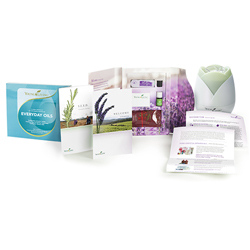
5. Choose “Premium Starter Kit” and select which diffuser you would like. This kit includes the “Everyday Oils” kit (10 of the most commonly used oils), as well as Stress Away oil and a FREE diffuser!
6. Continue to the payment page. (If you get logged out before this page, just simply log back in with the username and password you’ve created and make sure your order is completed.)
Once you have signed up and have ordered your oils, I will add you to my Facebook page Droppin Mommas! This page is very useful when starting out with Young Living. I, as well as many others, post helpful tips, advice, and recipes regarding essential oils.
I know you will absolutely LOVE Young Living’s essential oils as much as I do. They have literally transformed my wellness cabinet as well as the health of both my family and I.
If you have any questions, please feel free to comment below!
Cheers to a healthy life done right!!
 Whole Lifestyle Momma
2 responses to “How To Order Young Living Essential Oils…”
[…] you want to know how to get Young Living essential oils, click (here) or comment […]
[…] If you would like to find out how to order Young Living essential oils click here. […]